
Image Help & Support
We believe that high-quality photos of your old house are the key to attracting buyers. To help you get the most out of your listing, we offer these guidelines.
Submitting Your Old House Images for Your Listing
To upload directly from your computer or digital camera:
- After you Start Your Listing and provide your basic listing information, our Listing Editor will allow you to upload your images directly from your computer.
- Click the "Add an image" link on the Listing Editor page. The Image Editor now displays with a form for locating your image on your computer or digital camera. Once you have located your image and added a caption and description (optional), click the "Add Image" button at the bottom and your image will upload to your listing.
- Once you upload your image, 4 sizes will be created to be used throughout our site. This will ensure that the best quality image is displayed for your listing.
- If you experience difficulties uploading your images you can email them to joe@oldhouses.com. Please provide your contact information and listing ID (if available).
To send your images to us:
- After you Start Your Listing and provide your basic listing information, you can send your listing images to us. We'll gladly add the images to your listing for you. You can email or mail your images.
- To email your images, attach your images to an email message addressed to joe@oldhouses.com. When attaching multiple images to an email, we recommend compressing them into ZIP or STUFFIT files. Please provide your contact information and listing ID (if available).
- To mail your images, burn them onto a CD and mail them to
OldHouses.comSorry, CDs cannot be returned.
713 E, Main St.
Union, SC 29379
Be sure to include your contact information with your images. We also suggest including a caption and/or description of each image, and the year taken, if known.
Managing Your Images
Once you have uploaded images to your listing, you can edit them, replace them, hide them or delete them.
From the listing Editor page, there are two ways to do this. First, you can click on the Edit buttons that float over the images. Second, you can use the Image Manager. Look for the button on the toolbar on the right side of the page.
The Image Manager displays all of your images in a column. From here you can edit your image information by clicking on the Edit links (this is the same as clicking the image Edit buttons on the listing Editor page). You can also rorate the images, hide and un-hide them, change their sequence, and delete them from the Image Manager.
Having Trouble?
There are many reasons you may not be able to upload images including: corrupt image file, large file size, slow internet connection, and wrong image format. If you are not able to upload your images with the Image Editor, email them to us along with your contact info and listing ID. We'll add them to your listing for you.
Image Dimensions
Send us the largest version of the image you have. We will automatically re-size it as needed to display effectively on the Web site.
Image Format and File Size
You must send images in JPEG or PNG format. These are the most popular format for digital photos and are best for this kind of site. Image files should have a .jpg, .jpeg, or .pgn extension.
The maximum file size for any image is 30 megabytes. Most digital cameras and smartphones produce images between 2 and 5 megabytes in size, which is plenty for use on the website. Plus, they upload a lot faster. If your camera is producing images larger than our maximum limit, there will be a way to reduce the resolution.
Image File Names
The file name of the image nevers shows up on the public part of the site, so it doesn't really matter what you name it. Usually the name assigned by your phone or camera (e.g., DSW_0054.jpg) is just fine.
If you happen to upload a new image with the same file name as a previous image, we will rename it so they don't get mixed up.
If you want to upload an image that you have renamed, please observe these guidelines:
- Do not include spaces or special characters in your image file name.
- If there are a lot of words, smash themTogetherLikeThis, or use underscores_like_this.
- Shorten the name if it is very long. Keep it down to a couple dozen characters at most.
Image Resolution
Resolution refers to level of detail in your image, expressed in the number of pixels per inch. The higher the pixels per inch, the more detailed the image (and the bigger the image file size).
Your digital cameral is probably capable of taking high-resolution images at 200 pixels per inch or more, but this is more resolution than we can display on today's websites, so we automatically reduce the resolution to display the images effectively and quickly.
If you are uploading a lot of images, or if Internet bandwidth is is short supply, you can adjust your camera or use software to create lower-resolution images. These will be smaller and will upload more quickly. But we recommend uploading the largest version you have anyway; this will allow them to keep up with advances in browser display technology.
Composing Your Images
For best results on OldHouses.com, we offer the following tips for composing and taking your images:
- Start with the Main Shot. Your main shot will be often be the one people see first, and usually in thumbnail size. This should be a full-on shot of the front of the house, although you might consider standing a bit off to one side to add depth to the image. Fill up as much of the image with the house itself if you can, so it will show well in lists. Landscape shots are terrific if you have good views, but avoid using them as the main image.
- Cover The Basics. Everyone will want to know what the kitchen and at least one bathroom look like, so make these a priority.
- Keep the Captions and Descriptions Short. These are optional, and we find that they work best if you use them consistently, or not at all. If the descriptions are very long, or if they vary a lot in length, your listing page may look a little untidy.
- Streetscapes: highlight your surroundings if they add to the value of your listing. Have a sleeping porch with a view? Get a shot of the view from the window.
- Seasonal Photos: if your listing period covers a change in seasons, keep in mind that you can swap images anytime. Change them to reflect the new season.
- Close-up images: include a close-up of a feature that might not be noticeable in the whole-house shot.
- Historical images: buyers love to see and read about the history of your house. Old shots that have the same view as a recent image are especially good.
- Extreme Closeups: ornate doorknobs, arched doorways, transoms: these elements can tell buyers a great deal about your home's history and condition. If you enjoy noticing these elements as you live in your home, your buyers will probably appreciate them too.
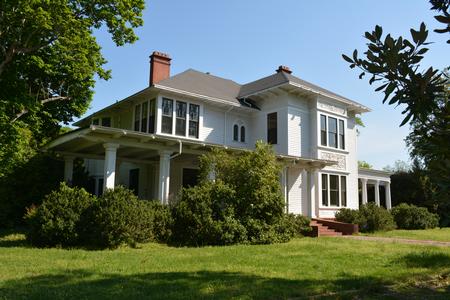 OldHouses.com headquarters, Union, SC.